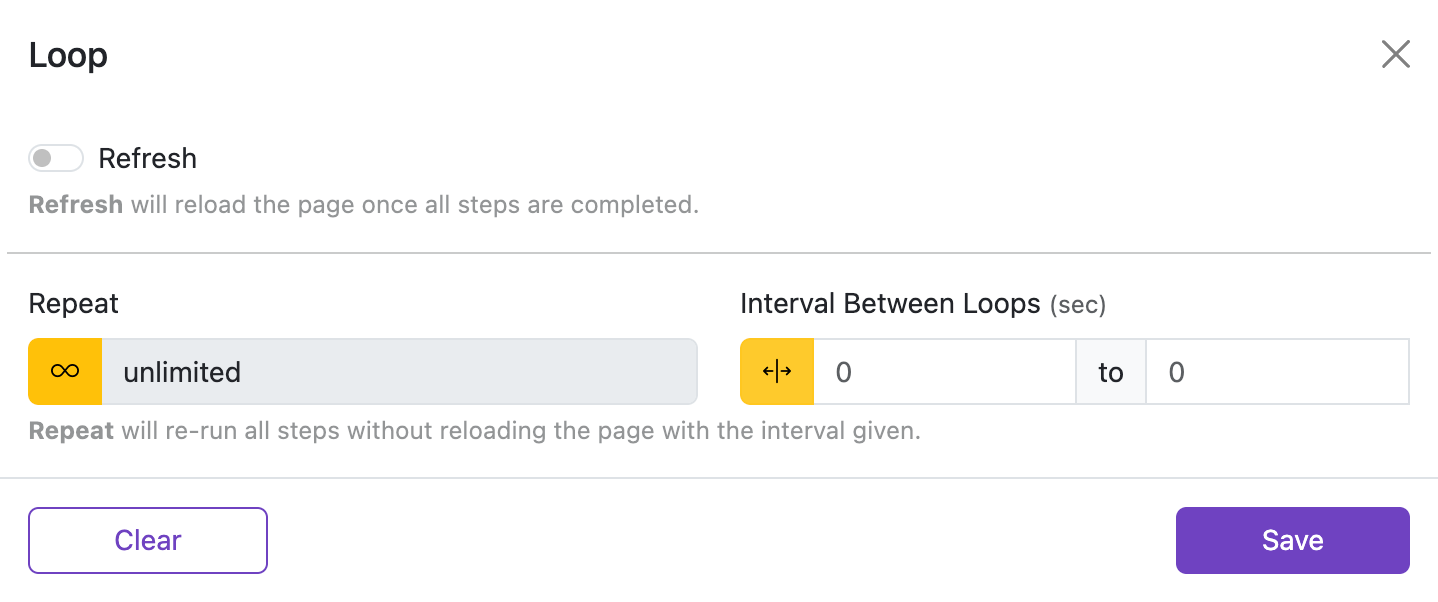
Configure how many times an automation repeats, the interval between loops, and whether to refresh the page after completion.
<loopRepeat> count up on each batch.Refresh
Refresh the page after all steps in the automation complete successfully.
- Enable this when you want to reload the page between runs instead of looping through steps again.
- Refresh and Repeat cannot be used together. Use one or the other.
Repeat
How many times the full automation should run.
- Leave it blank or
0to run once. - Enter any positive number for a fixed loop count, for example
5to run five times. - Click the infinity button (∞) to keep looping until you stop it manually.
Unlimited mode

Click the ∞ button next to the input to switch to unlimited mode. The number input is disabled and the extension keeps retrying until the element is found or the automation is stopped manually.
You can also use the repeat index inside a Target or Value by using the <loopRepeat> placeholder. The placeholder is replaced with the current 1-based loop index during execution.
<batchRepeat> is still supported as a backward-compatible alias.
Example:
- Without repeat index:
//table/tr[1]/td[1]/buttonselects only the first row button. - With repeat index:
//table/tr[<loopRepeat>]/td[1]/buttonand Repeat =3iterates rows 1, 2, and 3.
Interval Between Loops (sec)
How long to wait between each loop of the automation.
- Enter a single number for a fixed delay (for example
2for a 2-second pause between loops). - Click the range button to set a random delay between a minimum and maximum value — useful when you want less predictable timing.
- Leave it blank to start the next loop immediately.
Examples (seconds)
0.5— half a second1— one second1.5— one and a half seconds2— two seconds

From 1andTo 4— random value between 1 and 4 (enable range mode first)From 2andTo 3— random value between 2 and 3 (enable range mode first)From 0.5andTo 1.5— random value between 0.5 and 1.5 (enable range mode first)- Leave blank to use the default value (or start immediately, depending on the field)