Added in v4.0.47View on GitHub
Userscript
Author custom JavaScript that can run as a full step alongside other steps.
On this page
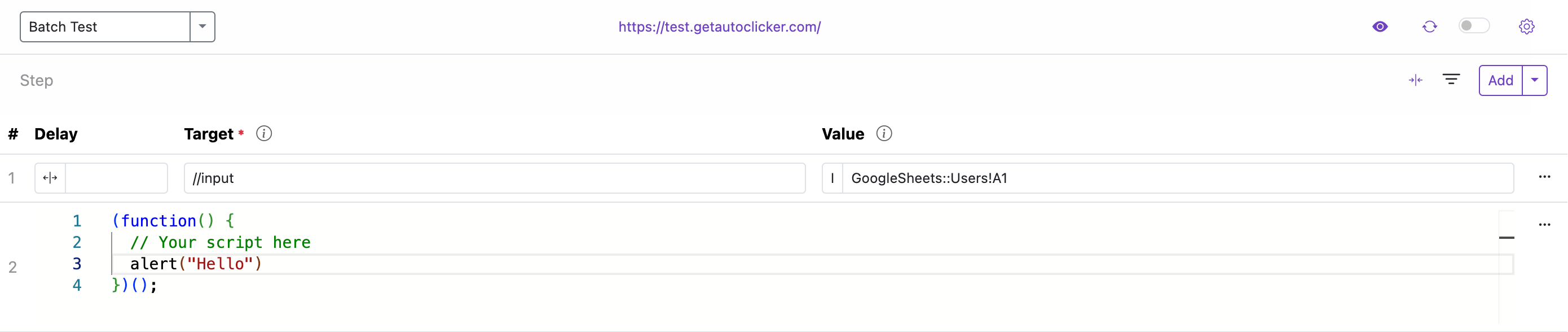
What is a Userscript?
A Userscript lets you run your own JavaScript as a first‑class Step. It can replace a step’s Name, Init Wait, Repeat, and Repeat Interval fields with code‑driven logic.
Key points
- Added via the new “Add Userscript” button next to Add Step
- Runs alongside regular steps in the same loop
- Access to runtime variables like
sessionCount,actionCount,batchCount, and Google Sheets data - Values are exposed on the global
windowobject for easy reuse
Before using Userscripts, enable the “Userscript” switch in the extension’s details page.
How it runs
- Userscripts execute in the same sequence as other steps.
- You can mix Userscripts with standard steps.
- Timing (init wait, repeats, and intervals) can be handled entirely from your code.
Window object reference
The extension exposes runtime context on window.ext for easy reuse inside Userscripts.
TypeScript shape
export interface IExtension {
  __currentAction: number;
  __currentActionName: string;
  __actionError: string;
  __actionRepeat: number; // current step repeat index (legacy field name)
  __batchRepeat: number; // current loop repeat index (legacy field name)
  __sessionCount: number;
  __sheets?: ISheets; // Google Sheets data (when configured)
}
Example usage
// Read current counters
const { __sessionCount, __currentAction, __currentActionName } = window.ext || {};

// Use Google Sheets data if available
const username = window.ext?.__sheets?.[0]?.username ?? 'Guest';
document.querySelector('input[name="username"]').value = username;
Implementation note
// Internally, the extension populates the global object similar to this:
const ext: IExtension = {
  /* ...runtime values... */
};
// Option A (object):
window.ext = ext;
// Option B (serialized):
// window.ext = JSON.stringify(ext);
Minimal example
// Example: type text into an input and click a button using window.ext data
const user = document.querySelector('input[name="username"]');
if (user) {
  const username = window.ext?.__sheets?.[0]?.username ?? 'Your name';
  user.value = username;
}
document.querySelector('button[random]')?.click();
Ask ChatGPT to generate Userscripts
You can ask ChatGPT to draft a Userscript for you. Try prompts like:
- “Write a userscript for Auto Clicker – Auto Fill that fills input[name="username"] with ‘Alice’ and clicks button[random]. Include null checks.”
- “Generate a userscript that waits up to 5 seconds for a selector, then types a value from window.acfSheets[0].username.”
- “Create a userscript that loops 3 times with a 1.5s delay between iterations and updates window.actionCount.”
Tips
- Include your target selectors (CSS or XPath converted to CSS if needed).
- Mention any timing needs (delays, retries), and the globals you intend to use.
- Ask for defensive code (null/timeout checks) to avoid errors on dynamic pages.
Troubleshooting
- Ensure the Userscript toggle is enabled on the extension details page.
- Open DevTools → Console and filter by “Auto Clicker – Auto Fill” to view logs.
- Use the Status Bar to see loop/step progress and timing.