State Guard
Configure guard rules that test statuses of previous steps. If the guard matches, the current step runs; otherwise the selected fallback is applied.
State Guard - Available from the second Step onward because the first step has no previous status to check. - Can reference any earlier step, not just the
immediately previous one.
Step 2 is skipped because step 1 (missing element) was not DONE, while step 3 still runs.
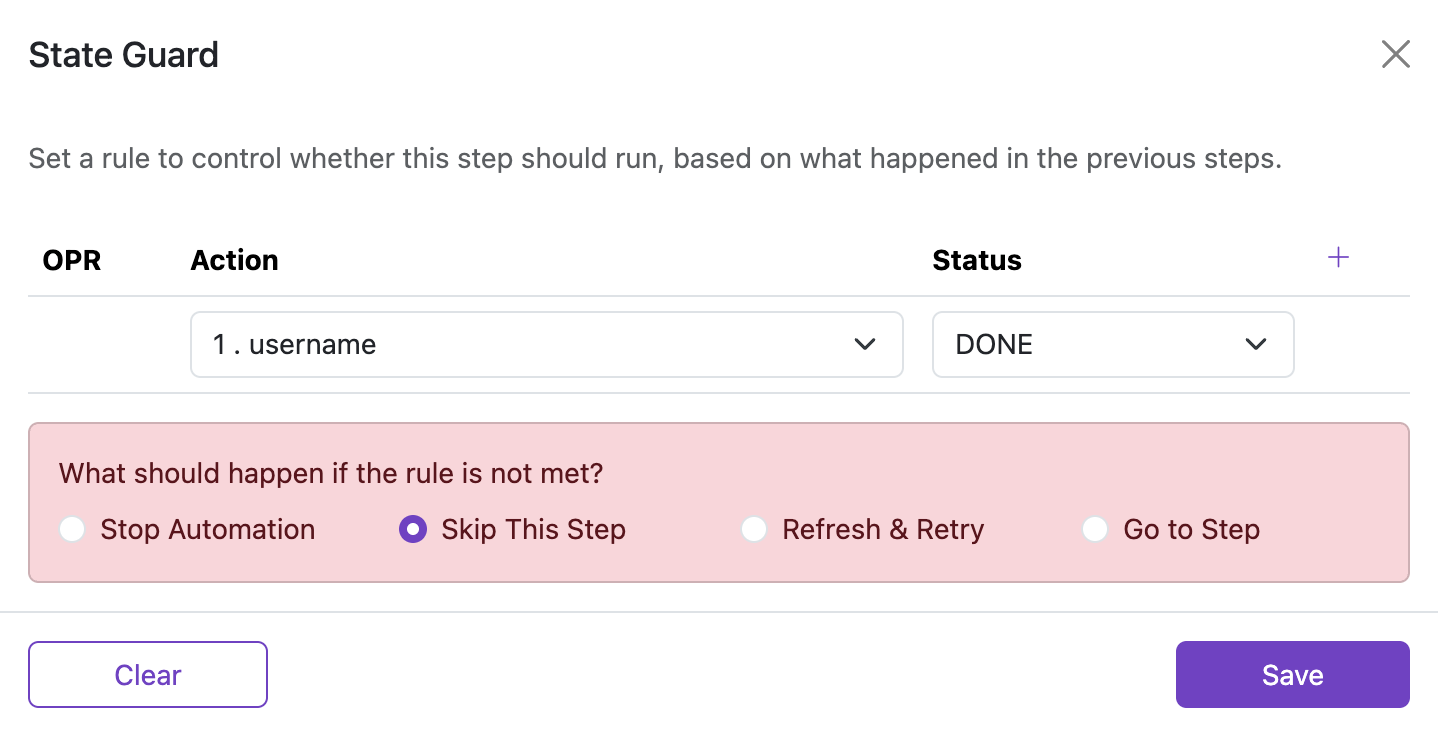
State Guard modal
Use the conditions grid to define how the current step should react to the results of previous steps. When the combined guard evaluates to true, the step runs. When it evaluates to false, a fallback option is applied.
Conditions
Define one or more rows that evaluate the status of earlier steps. Combine rows with logical operators AND and OR.
Columns:
- OPR: Operator that combines this row with the previous one (
ANDorOR). Defaults toAND. - Previous Step: The earlier Step whose status you want to check.
- Result: The status to compare against (
DONEorSKIPPED). - Controls: Add or remove condition rows.
Status semantics:
- A step is
DONEwhen it completed successfully. - A step is
SKIPPEDwhen it was skipped because of its own conditions or flow control.
When you have multiple rows, the OPR controls how they are combined. Truth table examples:
| Step 1 status result | OPR | Step 2 status result | Result |
|---|---|---|---|
| true | OR | true | true |
| true | OR | false | true |
| false | OR | true | true |
| false | OR | false | false |
| true | AND | true | true |
| true | AND | false | false |
| false | AND | true | false |
| false | AND | false | false |
What should happen if the rule is not met?
If the combined guard evaluates to false, select one of the fallback options shown in the modal:
- Stop Automation — end the workflow and do not execute further steps.
- Skip This Step — move to the next step.
- Refresh & Retry — reload the current page and continue according to the automation flow.
- Go to Step — jump to a specific step in the list.
Behavior summary:
| Conditions matched? | Selected option | Result |
|---|---|---|
| true | — | Process Step |
| false | Stop Automation | Stop Automation |
| false | Skip This Step | Skip This Step |
| false | Refresh & Retry | Refresh the page |
| false | Go to Step | Go to specified step |